
How can we help?
Here you will find video tutorials, manuals and answers to the most common questions about electric scooters and e-bikes. If you can't find what you need, write to us: a technician will reply.
Watch the videos and download the manual for your ride: they explain first use and brake adjustment. Questions about procedures already described in the manuals or videos receive an automatic email with a link to the material.
See how it's done.
Download the manual for your ride.
Instruction manual in Italian.
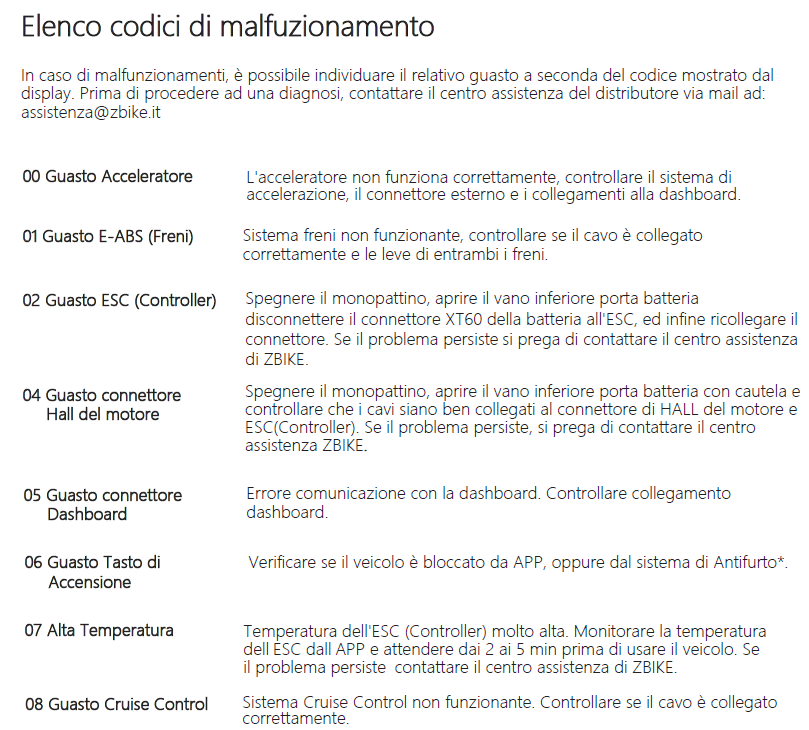
Warning lights, faults and solutions.
Steady triangle light with audible alarm
The fault light, a yellow triangle, is followed by a code from 1 to 9 shown on the speedometer when the scooter is stationary. Each code indicates a different fault or warning, as listed in the table.
Critical battery level: a single red or white bar and an audible warning
The bar turns red after the others have gone out as the battery discharges. If it appears with the audible warning, stop riding immediately and charge the battery to avoid damaging it.
Warning: fully discharging the battery can damage the cells irreparably. Never go below 20%. When you are not using the ride, leave the battery at 50–60% (never 100%) and check the charge at least once a month.
A single red bar with a charged battery: high temperature (V3 with earlier controller)
If the light comes on suddenly with a charged battery, or as soon as you switch on the scooter, the sensor has detected a higher than normal temperature. This usually happens after standing in the sun for a long time or after prolonged heavy effort.
Move the scooter into the shade and let it cool down for a few minutes until the warning disappears. The light does not stop the scooter, but if you ignore it for a long time the motor switches off for safety until it cools down. If the light stays on once the scooter is cool, contact support.
The display freezes on the last reading
When the temperature is borderline, for safety the display freezes on the last reading: this is the state before the high-temperature light. It does not stop the scooter: follow the same procedure and let it cool down. If the screen does not return to normal, contact support.


The scooter won't start even though it's switched on
For safety, electric scooters don't start from standstill, to avoid accidental starts if you touch the throttle. Give an initial push and then accelerate: above 5 km/h the motor unlocks. You can enable ZERO START from the display (see "Multifunction display instructions" in the Aerlang H6 V3 manual), but we don't recommend it.
The rear wheel is locked
The wheel isn't faulty: the lock from the GTSCOOTER / ZBike app is active. Download the app and unlock the scooter with your code. If you have forgotten the code, email [email protected] with your Aerlang's code, shown in the app as "Device ID".
Brake adjustment
Before riding, check that the brakes are correctly adjusted, as shown in the video tutorial.


Handlebar height adjustment
Raise the handlebar only until it engages the stop, as shown in the photo (boxes 1 and 2). Don't go further: it would strain the wiring and the damage is not covered by the warranty.

Handlebar grip adjustment
Before raising the handlebar grips, check and if needed adjust the grub screw of the mechanical coupling: if it is unscrewed too far, the grip won't fit into its seat.

Talk to a ZBike technician.
Write to us through the contact form with your ride's model and order number: we'll get back to you as soon as possible.
Open the contact form- Technical support
- [email protected]
- Phone (warehouse)
- +39 035 494 3263
- Opening hours
- Monday–Friday, 9am–4pm
